07 July 2026
BC — the CONFIGPACK Configuration Package
How to move a config package between BC environments without dragging the data along.
Every Business Central (BC) consultant, and lots of key-users have used the configuration package functionality. This tool allows us to migrate data from or to BC. We have, basically, 2 options:
- We define a configuration package (tables, fields, validations, …) and export this package in an Excel format. The data are immediately available in Excel for further processing, and it is possible to add data to the Excel file for import in BC.
- We export the package as a whole: the config package information (tables, fields, …) as well as the data are exported from BC. The file format is .rapidstart, and this is basically a compressed xml file. We open the rapidstart file in another BC company or database. Typically, this procedure is used to migrate data between 2 BC environments (e.g. sandbox to production).
Now, the latter is interesting, but we also migrate all the data in the tables of the config pack. And that’s exactly what I want to describe here: in some situations, you created a nice config pack, with some tables, some fields, validations on or off, changed field sequences, and you want to re-use this config pack in another BC company or environment, but without the data! Neither of the options here above is okay, and that’s where the “CONFIGPACK” config pack comes up. Under the hood, the configuration packages we define are all stored in different tables, and these tables can also be exported and imported using config packs. The tables we need are:
- Table 8623 - Config. package. This is the table with the “header” information about the config pack, Code, name, language ID, version, and so on.
- Table 8613 - Config. package table. In this table, we define which tables are part of our config pack
- Table 8616 - Config. package field. This is the table where the fields are defined we want to export or import using our config pack
There’s one table we don’t use explicitly here, and that’s table 8615. We don’t want to include this one in our config pack, because this is exactly the table holding the data itself, see it as a buffer table. So the CONFIGPACK config pack should look like this:
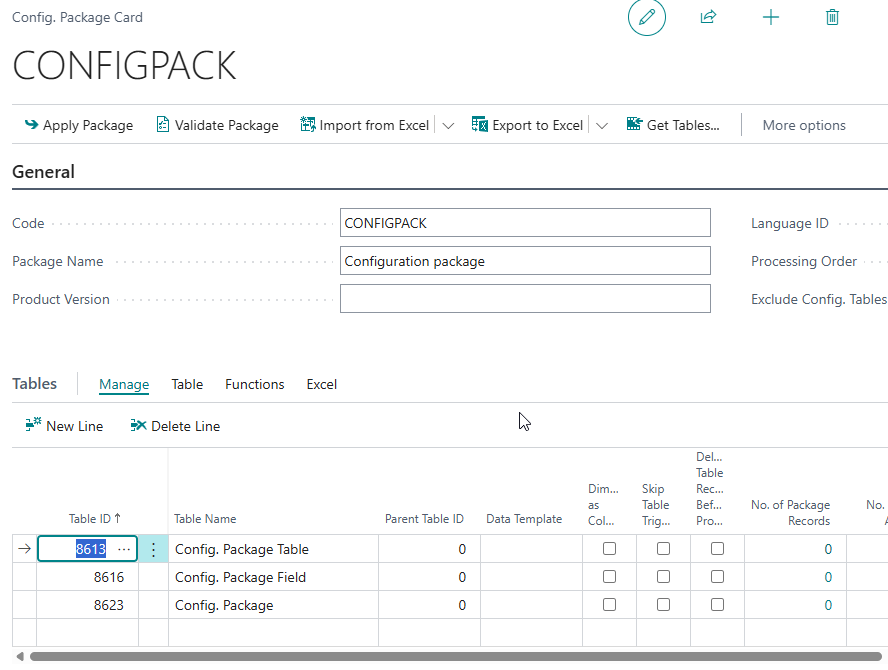 The CONFIGPACK card. Note the three tables 8623, 8613 and 8616
So far, we have our config pack. We can export and import it like every other config pack. We can export the whole package as a rapidstart file, or as an Excel file, both are okay.
One more remark here: without filters, this CONFIGPACK config pack will contain ALL the packages we ever made in the given company, and we don’t want this. Mostly, we only need one particular config pack. This can be realized by using a table filter in the detail section where we define our 3 tables. We have to define the filter for all 3 tables. Imagine we created a config pack to export customers, and you called your config pack CUSTOMER, you define a table filter saying field ID 1 is “CUSTOMER”.
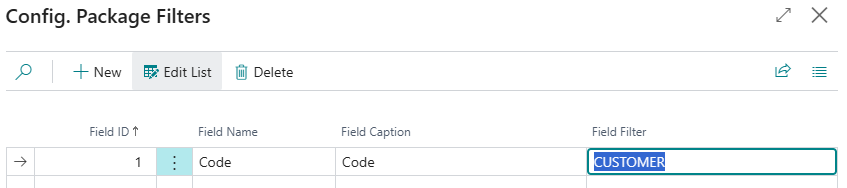 The table filter: Field ID 1 (Code) filtered on “CUSTOMER”, so the CONFIGPACK only picks up that one package.
And now, our CONFIGPACK Config pack is ready! There’s one caveat however: we all know that a config pack must be imported first, which imports our data in some kind of intermediate table. In a second phase, we apply our package to realize the real import in the company tables. And here we need to apply the package table by table, and in the right sequence. First, you apply table 8623. Doing so, the config pack ID is known and we can go on with the underlying tables. The second table to validate is 8613 for the tables and finally 8616 for the fields. If we don’t respect this sequence, the application of the tables will give import errors!
The idea for this approach is grown after many BC implementations, see it as some kind of “meta config pack” utility, or simply: we use config packs to move config packs. Enjoy!